Settings screen
turn-alerts logs a line when an agent turn ends, for failed or canceled turns only, or for every turn. The choice
lives in a settings screen in the app, and the server reads it on every turn.
One schema for both sides
A settings document is defined once in shared/ and stored per Paseo host. Defaults for every field make {} a
complete document, so a fresh install reads as valid settings.
import { defineSettings } from "@getpaseo/plugin";
import { z } from "zod";

/** One document per Paseo host, shared by every client of that host. Defaults make `{}` a complete document. */
export const preferences = defineSettings({
  id: "alerts",
  scope: "host",
  version: 1,
  schema: z.object({
    enabled: z.boolean().default(true),
    turns: z.enum(["failed", "all"]).default("failed"),
  }),
});
export type Preferences = z.output<typeof preferences.schema>;
The server reads them
registerSettings returns a handle: read() gives the current document, subscribe reports saves. The hook reads
on every turn, so a change applies to the next turn without a reload.
import type { PluginServerContext } from "@getpaseo/plugin/server";
import { preferences } from "./shared/preferences";

export default function contribute(server: PluginServerContext) {
  const settings = server.registerSettings(preferences);

  const stopWatching = settings.subscribe((next) => {
    if (next.status === "ready") console.log(`alert settings saved: ${JSON.stringify(next.values)}`);
  });

  const stopListening = server.on("agent.turn_ended", async (event) => {
    const current = await settings.read();
    if (current.status !== "ready" || !current.values.enabled) return;
    if (current.values.turns === "failed" && event.outcome.kind === "completed") return;
    console.log(`alert: turn ${event.outcome.kind} for agent ${event.agent.id}`);
  });

  return () => {
    stopListening();
    stopWatching();
  };
}
The screen
useSettings goes through loading, then ready or an error state with a reset action. A save sends the whole
document with the revision it was read at, so a save from another client in between is rejected instead of
silently overwritten. The settings components come from @getpaseo/plugin/client/ui and follow the app's theme.
import { Text } from "react-native";
import { useSettings, type PluginSurfaceProps } from "@getpaseo/plugin/client";
import { SettingsAction, SettingsCard, SettingsSection, SettingsSelect, SettingsSwitch } from "@getpaseo/plugin/client/ui";
import { preferences, type Preferences } from "../shared/preferences";

const TURNS = [
  { label: "Failed or canceled", value: "failed" },
  { label: "Every turn", value: "all" },
] as const;

export function AlertsScreen({ theme }: PluginSurfaceProps) {
  const settings = useSettings(preferences);
  const text = { color: theme.colors.foreground };

  if (settings.status === "loading") return <Text style={text}>Loading settings</Text>;
  if (settings.status !== "ready") {
    return (
      <SettingsSection title="Turn alerts">
        <Text style={text}>{settings.error}</Text>
        <SettingsAction label="Stored settings" actionLabel="Reset to defaults" onPress={() => void settings.reset()} />
      </SettingsSection>
    );
  }

  // Save the whole document with the revision it was read at; a save from another client in between is rejected.
  const save = (change: Partial<Preferences>) => void settings.save({ ...settings.values, ...change }, settings.revision);

  return (
    <SettingsSection title="Turn alerts">
      <SettingsCard>
        <SettingsSwitch
          label="Log an alert when a turn ends"
          value={settings.values.enabled}
          disabled={settings.saving}
          onValueChange={(enabled) => save({ enabled })}
        />
        <SettingsSelect
          label="Which turns"
          value={settings.values.turns}
          options={TURNS}
          disabled={settings.saving || !settings.values.enabled}
          onValueChange={(turns) => save({ turns })}
        />
      </SettingsCard>
      {settings.saveError ? <Text accessibilityRole="alert" style={text}>{settings.saveError}</Text> : null}
    </SettingsSection>
  );
}
The client registers the screen and a Command Center item that opens it:
import type { PluginClientContext } from "@getpaseo/plugin/client";
import { AlertsScreen } from "./client/alerts-screen";

export default function contribute(client: PluginClientContext) {
  const cleanups = [
    client.addSettingsScreen({ id: "alerts", title: "Turn alerts", icon: "Bell", Component: AlertsScreen }),
    client.addCommandCenterItem({
      id: "open-alert-settings",
      title: "Turn alert settings",
      icon: "Settings",
      context: "global",
      onSelect: ({ openSettings }) => openSettings("alerts"),
    }),
  ];
  return () => {
    for (const cleanup of cleanups) cleanup();
  };
}
Run it
npx ppd install path/to/recipes/settings
npx ppd web --viewport 390x844 --command "Turn alert settings" --shot out/settings.png
installing path/to/recipes/settings as turn-alerts into http://127.0.0.1:7800
turn-alerts: running (installed)
client: passes the app's registration rules
...
screenshot: ~/code/my-plugin/out/settings.png
console errors: none
plugin evaluation errors: none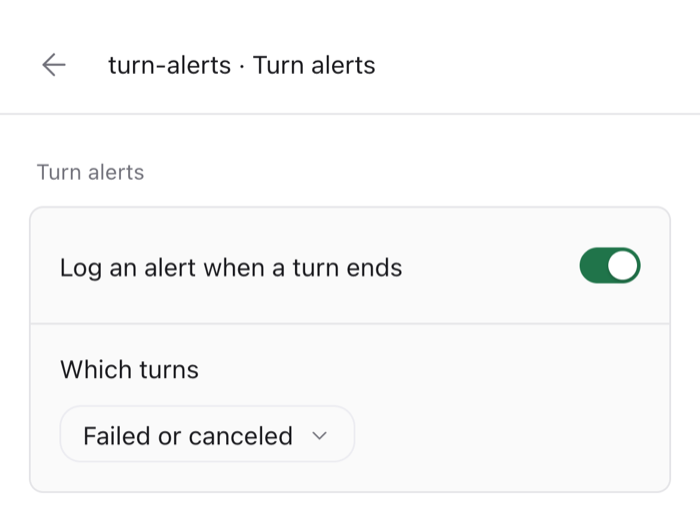
Click the switch by its label, and the server's subscription logs the saved document:
npx ppd web --command "Turn alert settings" --click "Log an alert when a turn ends"
npx ppd paseo -- plugin logs turn-alerts
2026-10-18T08:20:31.677Z stdout alert settings saved: {"enabled":false,"turns":"failed"}Switch it back on, run a failing fake agent turn (with --fake-agent on the daemon), and the hook logs the alert:
npx ppd web --command "Turn alert settings" --click "Log an alert when a turn ends"
mkdir -p /tmp/ws
npx ppd paseo -- run --provider fake-agent --cwd /tmp/ws '{"steps":[{"write":{"path":"b.txt","content":"b"}},{"fail":"boom"}]}'
npx ppd paseo -- plugin logs turn-alerts
2026-10-18T08:25:00.582Z stdout alert: turn failed for agent a812c7be-1ab0-4dc2-80e5-15ec4125766appd check evaluates the server with a settings handle that reads as the schema defaults and never reports a save,
so read and subscribe work during the check.