Getting started
From nothing to a plugin running on an isolated dev daemon, reloading on every save, with a screenshot to prove it.
About five minutes, most of it npm install.
You need Node 22.18 or newer and the Paseo desktop app (it ships the Paseo CLI and the compiler ppd check uses).
The output below is real; home directories are shortened to ~ and temp directories to $TMPDIR.
1. Create a plugin
npx --package paseo-plugin-devkit ppd create ~/code/my-plugin
cd ~/code/my-plugin && npm install
created my-plugin (panel template) in ~/code/my-plugin
base: paseo plugin init
.gitignore
OVERVIEW.md
README.md
client/hello-panel.tsx
index.client.tsx
index.server.ts
package.json
paseo-plugin.json
server/greet.ts
shared/rpc.ts
test/greet.test.ts
test/host-contract.test.ts
tsconfig.json
vitest.config.ts
next:
cd ~/code/my-plugin && npm install
npm run check && npm test
npx ppd daemon up && npx ppd devThe base comes from paseo plugin init, so the SDK version matches your Paseo. ppd create adds what init leaves
out: tsconfig node types, an @types/node ~22 pin, a .gitignore, vitest with a host-contract suite, the npm
scripts check, test, dev and typecheck, and a README. The panel template is a workspace panel called "Hello",
an "Open Hello panel" Command Center item and one RPC, hello.greet.
--template agent-hook creates a plugin that reacts to agent turns instead: see the timeline renderer recipe.
2. Check it against the host
npm run check && npm testPASS manifest my-plugin, requires paseo >=0.11.4
PASS imports client, server and shared boundaries hold
PASS dependencies no runtime packages
PASS paseo-compile compilePlugin of the Paseo 0.11.4 app (/Applications/Paseo.app) accepted the plugin
PASS client-requires client requires only host modules (@getpaseo/plugin, @getpaseo/plugin/client, react, react-native, react/jsx-runtime, zod)
PASS server-requires server requires only host modules and Node built-ins
PASS server-eval Paseo's evaluator ran the contribution in 0 ms; RPCs: hello.greet
PASS client-eval contributions: addWorkspacePanel, addCommandCenterItem
PASS hermes-class no class syntax in the client bundle
PASS hermes-parse hermesc compiles the client bundle
PASS hermes-vm Hermes VM evaluated the bundle and ran the contribution (addWorkspacePanel, addCommandCenterItem)
PASS lucide-icons 2 icon name(s) valid against 6354 Lucide icons of the Paseo 0.11.4 app (/Applications/Paseo.app)
PASS bundle-size client 5 KiB (2 KiB gzip), budget 2.0 MiB; server 2 KiB (1 KiB gzip), eval 0 ms, budget 32.0 MiB
13 passed, 0 warnings, 0 failed, 0 skippednpm test runs the unit tests plus test/host-contract.test.ts, which turns every check into a vitest test. What
each line means, and what a failure looks like, is on Host-contract checks.
3. Start a dev daemon
npx ppd daemon up --workspace .dev daemon "default" up
url: http://127.0.0.1:7800
home: $TMPDIR/ppd-default-2kCaQs
pid: 84941
paseo: 0.11.4
workspace created for ~/code/my-pluginA detached Paseo daemon in a fresh home under $TMPDIR, on the first free port from 7800 to 7899, with plugins and
the web UI on and relay, MCP and speech off. Your own Paseo keeps running on port 6767, untouched. --name runs
several dev daemons side by side; install, dev, paseo, web and android take the same --name.
4. Run the dev loop
npx ppd dev--- installing my-plugin into http://127.0.0.1:7800
my-plugin: running (installed) in 1865 ms
client: passes the app's registration rules
log 2026-10-18T08:25:34.284Z stdout [paseo] Loading plugin
log 2026-10-18T08:25:34.550Z stdout [paseo] Plugin ready
watching . (Ctrl+C to stop)Edit server/greet.ts (here Hello, became Hi,) and the plugin reloads, the client is re-checked, and new plugin
log lines stream in:
--- reloading: server/greet.ts
my-plugin: running (reloaded) in 1921 ms
client: passes the app's registration rules
  log 2026-10-18T08:25:43.954Z  stdout    [paseo] Stopping plugin
  log 2026-10-18T08:25:43.966Z  stdout    [paseo] Plugin stopped
  log 2026-10-18T08:25:43.966Z  stdout    [paseo] Loading plugin
  log 2026-10-18T08:25:44.247Z  stdout    [paseo] Plugin ready
ppd install does one install or reload without watching. Both report client-rejected when the app would drop
your client: see Troubleshooting.
5. Look at it
In another terminal:
npx ppd web --command "Open Hello panel" --click Greet --shot out/hello.pngopened workspace my-plugin (wks_61e6e477b7e141dd)
screenshot: ~/code/my-plugin/out/hello.png
console errors: none
plugin evaluation errors: none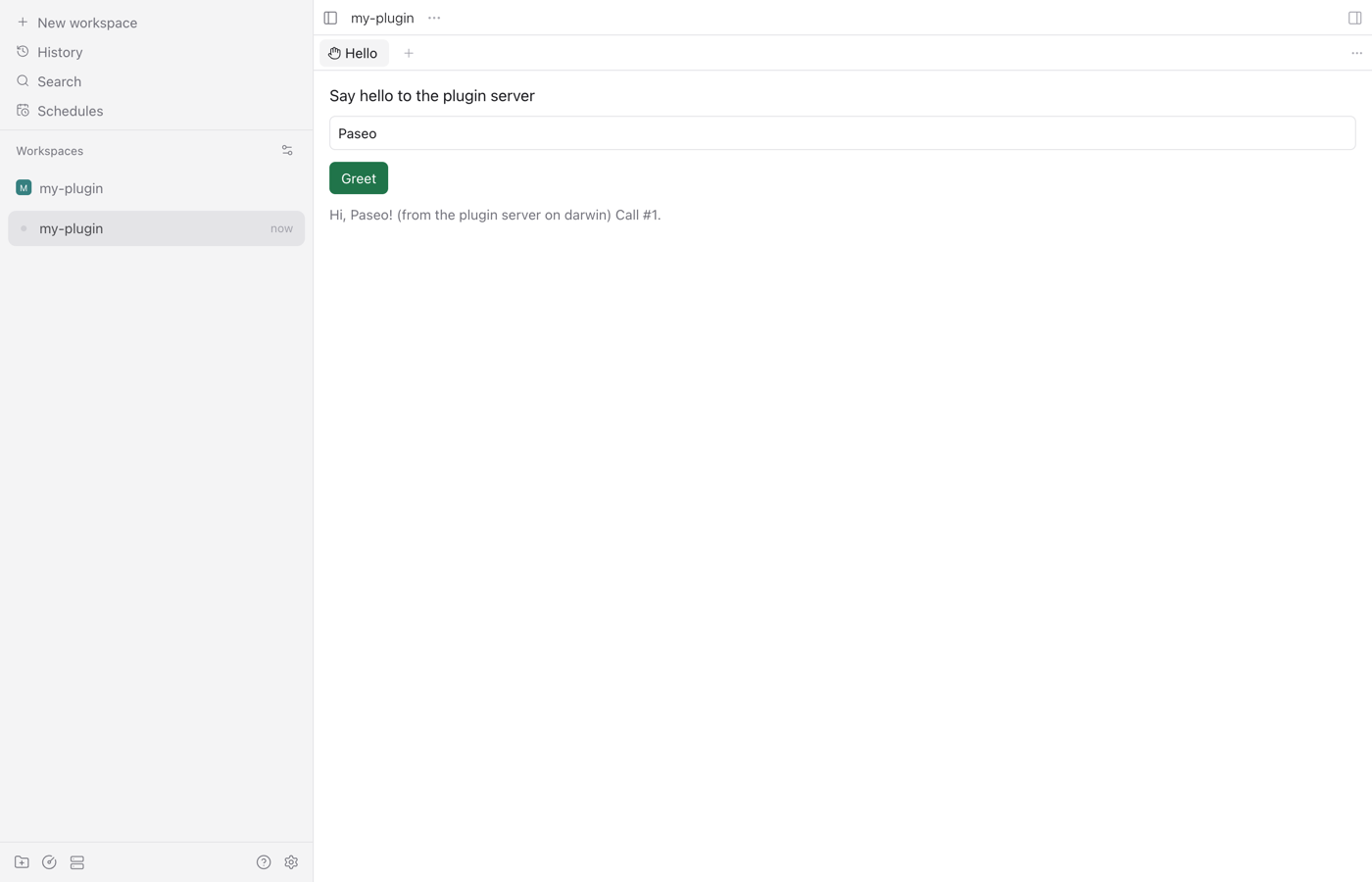
ppd web drives Chrome through Playwright: it opens the workspace, runs a Command Center item, clicks elements by
their accessible name, and prints console errors and any plugin client the app failed to evaluate (that one exits 1). --viewport 390x844 shows the compact (phone) layout and --headed shows the browser, which stays open when there
is no --shot. On a real phone: Testing on a phone.
6. Stop
npx ppd daemon downstopped dev daemon "default" (pid 84941)
removed $TMPDIR/ppd-default-2kCaQsThe repo ships a Claude Code skill, skills/paseo-plugin-dev, that teaches an agent this loop and the safety rules.
Copy it into ~/.claude/skills/ (all projects) or the plugin's .claude/skills/ and ask, for example, "verify my
plugin on a dev daemon and screenshot the panel".
Add ppd to an existing plugin
npm install -D paseo-plugin-devkit
npx ppd check
Then make the checks part of your tests:
// test/host-contract.test.ts: one vitest test per check
import { fileURLToPath } from "node:url";
import { describeHostContract } from "paseo-plugin-devkit/vitest";

describeHostContract(fileURLToPath(new URL("..", import.meta.url)));
and copy examples/ci.yml into .github/workflows/. It runs ppd check (as a labeled approximation, since Linux runners have no Paseo app) and ppd registry precheck on every push, plus a weekly job that checks your plugin against Paseo main, so upstream
changes break your CI before they break your users.